TikTok Content Production Cost Model: Count the Hours First
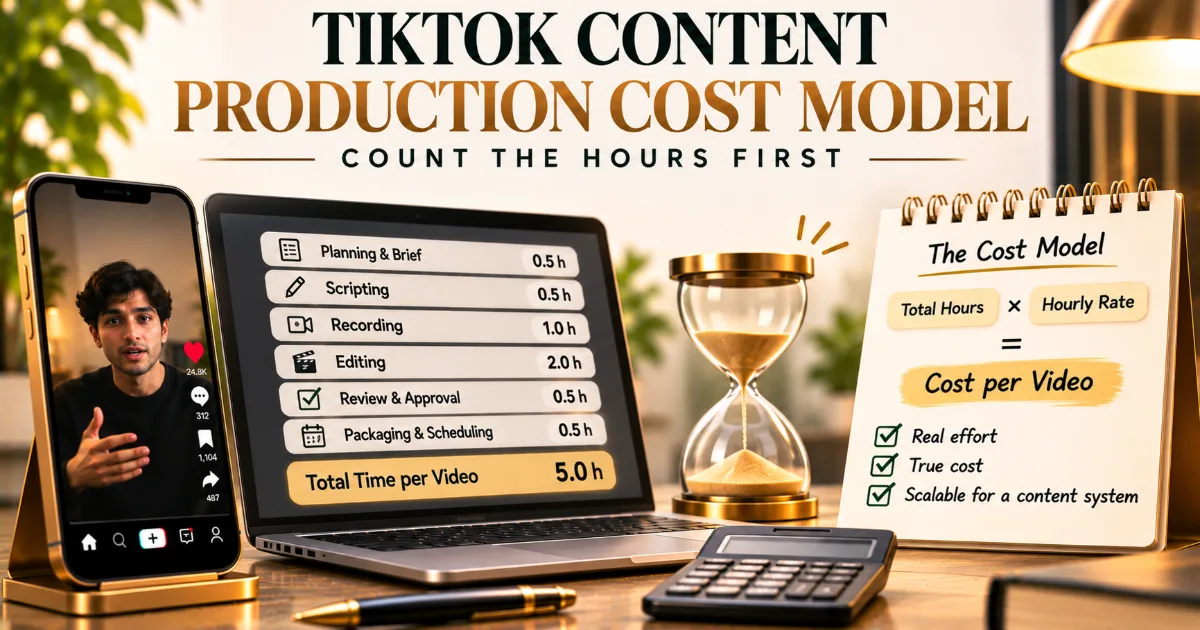
A TikTok content production cost model is a worksheet that counts the hours it takes to get clips from an idea to a live post, stage by stage, with every assumption written down. For a small business it is the honest place to start any decision about TikTok, because the real cost of short-form video is mostly time: someone plans it, someone records it, someone picks the moments, edits, captions, checks and posts. Money only enters when those hours are multiplied by what the business's own time is worth, and this post leaves that step to you. It sets out the assumptions to state first, the stages and where their hours go, which hours are fixed and which repeat with every clip, which hours automation can take on, how to measure real hours rather than guess, and one small accounting practice's worksheet.
Where a week of TikTok production hours goes, and what is left for people
- 01The week’s hoursevery stage from planning to performance review
- 02Transcribingtaken on by a tool
- 03Caption draftsdrafted from a checked transcript
- 04Packagingeach clip exported with its notes
- 05People’s hoursrecording, the final cut and the owner’s review
Relative, not measured
- TikTok content production cost model: count the hours before the price
- State the assumptions before counting anything
- The stages, and where their hours go
- Fixed hours and per-clip hours
- Which hours automation removes, and which it only moves
- Building the worksheet in a spreadsheet
- Measuring real hours instead of guessing
- A worked example: a small accounting practice's worksheet
- Reading the worksheet: when the hours justify a system
- Frequently asked questions
- Where to start
TikTok content production cost model: count the hours before the price
Most conversations about the cost of TikTok start with a price: for a tool, a freelancer, an agency. That puts the question the wrong way round. A price is only cheap or expensive against what the business is doing now, and few businesses know what that is. They know TikTok "takes a lot of time", but not how much, at which stage, or whose time it is. A cost model answers that before anyone quotes anything.
The columns of the cost model worksheet
- Stage
- one step between idea and live post
- Who
- the person or role who does it
- Per clip or batch
- whether the hours repeat for every clip
- Based on
- a measurement, an estimate, or a guess
- Automatable
- whether a tool could take the stage on
The model is deliberately simple. It is a table with one row per stage of production and one column per piece of information about that stage: who does it, how many hours it takes per clip or per batch, and what the number is based on. At the bottom it adds up the hours per week. Nothing in it needs a formula more complex than a sum, and nothing in it is a price.
| Column | What it holds | Why it matters |
|---|---|---|
| Stage | One step between idea and live post | Hours hide inside steps nobody named |
| Who | The person or role who does it | An owner's hour and an assistant's hour are not the same hour |
| Per clip or per batch | Whether the hours repeat for every clip | Batch hours shrink per clip as volume grows; per-clip hours do not |
| Hours | The time the stage takes on that basis | The number every later decision rests on |
| Based on | A measurement, an estimate, or a guess | A worksheet full of guesses should say so |
| Automatable | Whether a tool could take the stage on, in part or in full | The column that turns the worksheet into a decision |
The worksheet is the first half of a bigger question. Our guide to whether content automation is worth it for a small business covers the signs that a business is ready and the pilot that tests it; the cost model is how a business finds out whether its TikTok hours are large enough, and repetitive enough, for that question to be worth asking.
State the assumptions before counting anything
Every cost model rests on a few assumptions, and a model that hides them cannot be checked. Write them at the top of the sheet before filling in a single row. How many clips a week. How long each clip is. Where the material comes from: filmed for TikTok, cut from longer recordings, or a mix. Who is involved, and which of them is the owner. Whether captions and on-screen text are written fresh or drawn from approved material. How many rounds of review a clip goes through. Whether demos are filmed fresh from a fact sheet, as in the TikTok product demo content workflow, or cut from recordings that already exist changes the filming rows more than any other assumption.
Which assumptions decide the hours
- Where material comes fromfilmed for TikTok, or cut from longer recordings
- Clips per weekhow often each stage repeats
- Who is involvedand which of them is the owner
- Review roundshow many times a clip goes back
Those assumptions change the hours more than any tool does. Three clips a week cut from one recorded conversation is a different workload from three clips each filmed separately with a script. A clip that needs the owner's sign-off on every claim takes longer to approve than one built from answers the owner already approved. Writing the assumptions down also means the model can be rerun when they change, instead of being thrown away. Review time is one of them: a clip that goes through the five-part form in our Higgsfield AI video approval workflow takes minutes, and it belongs in the count. Generated video does not remove that recording for the clips that must be real, as our guide to Higgsfield AI vs real video explains.
The source of the material is the assumption that matters most. A business that already records long-form video, webinars or interviews has most of its raw material; the hours are in selection and editing. Our guide to TikTok clips from YouTube videos, interviews and webinars covers that route. A business that films each clip from scratch spends its hours on planning and recording instead. Our TikTok video brief template covers the planning that comes before a clip is filmed. For a filmed clip, the TikTok B-roll planning workflow adds a shot list to that planning, each shot tied to a script line.
The stages, and where their hours go
Most short-form production has the same stages, whatever the tools. Planning decides what each clip is for. Recording captures the material. Selection picks the moments that become clips. Editing cuts them to length and adds the opening. Captions and on-screen text are written and checked. Review checks each clip against what the business can stand behind. Publishing gets the clip onto the account with the right settings. Performance review reads how the clips did and feeds the next plan. Where clips are generated, credits spent against clips approved is the cost line to watch, and our AI video workflow audit reads it as retry waste.
Which production stages carry the hidden hours
Relative, not measured
Each stage hides its own hours. Captions look quick and are not: the W3C's guidance on captions notes that even correcting automatic caption files takes quite a bit of time for people who don't do it regularly. TikTok caption automation shifts those hours earlier, into checking the transcript once, rather than removing them.
Review is the stage most often left off the sheet entirely, because it happens in gaps: a message to the owner, a wait, a second message. It still costs hours, and the owner's hours most of all. The TikTok content approval workflow turns those gaps into one defined pass per clip, and the worksheet gives that pass its own row and its own hours.
Publishing and performance review close the list. Publishing is usually minutes per clip, but on TikTok some of those minutes stay with the account holder; our guide to the TikTok draft publishing workflow explains which. Performance review is an hour or so a week or a month, and our guide to the TikTok content performance review covers what it reads.
Three smaller jobs sit inside the bigger stages and are easy to miss. A founder's script check, when the person on camera is the owner, takes their time at the selection stage; our guide to the TikTok founder content workflow covers it. A rights check on people, footage and music takes time at review; our TikTok video rights checklist covers it. Reading the comments for questions takes an hour or so a week after posting; our guide to the TikTok comment research workflow covers it. Each deserves its own row, because each has an owner and a number of hours that would otherwise vanish into a bigger stage.
Fixed hours and per-clip hours
Some hours repeat with every clip and some do not, and the difference decides how the cost changes as the business posts more. Recording one long conversation that yields six clips is a batch cost: an hour of recording, spread over six clips. Editing each clip to length is a per-clip cost: it repeats six times. Writing the plan for the month is a fixed cost: it happens once whatever the number of clips. A planned series moves more of the work into that fixed column, as TikTok content series planning explains: the questions are chosen once, and each episode takes less effort afterwards.
How each kind of hours moves as clips per week grow
the monthly plan happens once whatever the number of clips
one recording spread over more clips, rising a little
editing repeats for every clip
Three shapes, not three measurements
The worksheet marks each row as fixed, per batch or per clip, because the totals behave differently. Doubling the number of clips roughly doubles the per-clip hours, raises the batch hours a little, and leaves the fixed hours where they were. A business considering more clips needs to know which kind of hours it would be adding.
Repeating the same stage the same way each time is also what makes it measurable and, later, automatable. A stage that is done differently every week has no stable number of hours to put in the sheet, and nothing stable for a tool to take on.
One per-clip row is often set to zero by mistake: a clip carried over from Reels or Shorts. TikTok's For You feed eligibility standards make reproduced content uploaded without new or creative edits ineligible for the For You feed, and give content carrying someone else's visible watermark as an example. TikTok's Creator Academy article on its originality policy describes unoriginal content as largely repurposed from another source without adding any creative edits. So a carried-over clip still needs its own edit for TikTok, and the worksheet gives that edit its own per-clip hours rather than none. If that edit includes a new opening, the TikTok hook rewrite workflow adds a check against the source to those hours, which is worth counting rather than skipping.
Some hours arrive on no schedule at all. When a price, a product detail or an offer changes, the clips that state the old fact have to be found and refreshed, and that work lands on the same people as new production. The worksheet gives it a row of its own, estimated per month rather than per clip. Our guide to the TikTok content refresh workflow covers how those clips are found and updated.
Which hours automation removes, and which it only moves
The automatable column is where the worksheet becomes a decision. Some stages can be taken on almost entirely by a tool: transcribing a recording, drafting captions from a transcript, finding candidate moments, resizing and exporting files, packaging a clip with its notes. Some can be shortened but not removed: editing, because a person still makes the final cut; review, because a person still decides. Some stay where they are: recording, because the business's own people are the material, and the owner's approvals, because they are the owner's.
What automation does to each stage
transcribing, caption drafts, exporting, packaging
- tool
editing and review, with a person deciding
- person checks
recording and the owner’s approvals
- the owner’s
Automation also moves hours from one person to another, and the worksheet should show that. A tool that drafts captions saves the writer's time but adds a checking step, often for someone more senior. Evidence from other kinds of work suggests the savings vary by person. In a study of more than five thousand customer support agents, Erik Brynjolfsson, Danielle Li and Lindsey Raymond found that access to a generative AI assistant increased productivity by 15% on average, with substantial differences between workers and the largest gains among less experienced ones. Short-form video is a different job, so the number does not transfer, but the lesson does: measure the business's own hours rather than assuming a saving.
The publishing minutes: what TikTok lets a tool do
Publishing is the one stage where TikTok's rules, not the tool, decide the automatable column. TikTok's Content Posting API has two routes: Direct Post, which publishes to the creator's profile, and Upload, which sends the video to the creator's TikTok inbox as a draft that the creator finishes and posts inside TikTok. TikTok's Direct Post reference restricts everything an app posts to private viewing until the app has passed TikTok's audit.
TikTok's Content Sharing Guidelines then keep three of those minutes with a person. An app made only to upload to "the account(s) you or your team manages" is named as unacceptable for the audit, so a business cannot get its own posting tool approved; it posts through a scheduler whose TikTok integration TikTok has approved, or by hand. The rule binds every tool at every price, which is why what content automation software costs treats platform rules as a limit no paid tier removes. The creator picks who can see each post from a dropdown that has no default value. And marking a post as promotional or branded content is a toggle the creator sets, off until they turn it on.
The tools follow from that. n8n has no built-in TikTok node, and reaching TikTok's API through its HTTP Request node is still bound by the audit. Zapier's TikTok Lead Generation app has one trigger, New Lead, for ad leads, and Make's TikTok Campaign Management app manages ad campaigns and asks for API access approval; neither posts a video.
So the worksheet can mark transcription, caption drafts and packaging as automatable, and should leave a few minutes per clip in the publishing row for a person or an approved scheduler. A Make.com scenario, drawn as a canvas of modules, or a Zapier Zap can still carry those automatable rows between people and files, and our Make.com content guides compare that canvas with Zapier and n8n.
Once a workflow is running, it can report its own savings. In n8n, Insights lets you set a fixed amount of time saved for each workflow, or calculate it from the path each execution takes, and shows it alongside run counts and failures. A workflow started on a timetable by the Schedule Trigger node can then be compared week by week against the hours the worksheet recorded before it existed.
Building the worksheet in a spreadsheet
The worksheet needs no special tool. A shared spreadsheet with the columns above, one row per stage per person, is enough. A total per week is the per-clip hours multiplied by clips per week, plus the batch hours multiplied by batches per week, plus the fixed hours spread across the weeks they cover. Write the formula once and every assumption at the top feeds it.
The cost model as one shared spreadsheet
- tiktok-cost-model/ one shared spreadsheet, no special tool
- assumptions clips per week, length, source, review rounds
- stages/ one row per stage per person, with typical hours
- weekly-total per-clip, batch and fixed hours added up
- by-person-and-stage a pivot table of the same hours
- notes the exceptions, not the typical week
Every assumption feeds the weekly total through one formula
Two spreadsheet features do most of the work. Google's help page for SUMIF describes it as returning a conditional sum across a range, which answers questions like "how many of these hours are the owner's" or "how many hours are marked automatable" from one column of names or flags. A pivot table then shows the same hours by person and by stage at once, which is usually the view that surprises people.
Describe each stage's time the same way every time. The hours column holds the usual time for a stage, not the worst week or the best one, and a note column holds the exceptions.
In Claude Code, the same worksheet can be kept as a plain file in the project that holds the content workflow, so that when a stage changes, the hours and the assumptions are updated in the same change.
Measuring real hours instead of guessing
The first version of the worksheet is mostly estimates, and that is fine as long as it says so. The second version should be measured. For two weeks, everyone involved notes the time they spend on each stage, roughly, at the end of each day. Two weeks is long enough to see more than one batch and short enough that people keep doing it.
Measuring real hours as one small experiment
predict each stage’s hours
everyone notes their time for two weeks
compare the measured hours with the prediction
The measurement is a small experiment, and it helps to treat it as one: write down the hours you expect before the two weeks start, measure them, compare the two, and fix the sheet before using it to decide anything.
Measurement usually changes the picture in the same two ways. Review takes longer than anyone estimated, because of the waiting. And one stage turns out to belong to the owner when everyone assumed it did not, often the final look at each clip before posting. TikTok's help page on making a post explains that a post can be saved to drafts, visible only to the account holder, which is often where those final looks happen, unrecorded.
A worked example: a small accounting practice's worksheet
Take an illustration, not a client. A small accounting practice with two partners and an assistant wants to post two TikTok clips a week answering common questions from small business owners. Before choosing a tool or asking for help, the practice manager fills in the worksheet. Her assumptions, written at the top: two clips a week, each under a minute; clips cut from one recorded conversation every fortnight, giving four clips; the senior partner appears on camera; every clip is checked by that partner before posting.
What two weeks of measuring changed in the practice’s worksheet
The first estimatesAfter two weeks of measuring
Captions take a quarter of an hour a clip
twice that, because accounting terms are misheard
Review is one quick check
a wait and one round back and forth
Nobody counted the drafts
the partner watches every clip again before posting
Her first estimates, before measuring, are an hour of recording per fortnight, half an hour of planning per fortnight, and per clip a quarter of an hour of selection, three quarters of an hour of editing, a quarter of an hour of captions, a quarter of an hour of review and a few minutes of publishing. On those estimates the practice spends a little under four hours a week on two clips, about an hour of it the senior partner's.
Two weeks of measurement change it. Captions take twice the estimate because the automatic captions mishear accounting terms. Review takes longer, because each clip waits for the partner and goes back and forth once. The partner also turns out to watch every clip again in drafts before the assistant posts it, which nobody had counted. The measured total is closer to five and a half hours a week, and the partner's share has nearly doubled.
The automatable column then makes the decision clearer. Transcription and caption drafting from a checked transcript could take most of the caption hours. Packaging each clip with its notes could take the publishing minutes. Neither the recording nor the partner's review can be automated, but the review can be shortened by building clips from answers the partner has already approved. The practice decides to change how review works first, because it is the partner's time, and to revisit tools once the worksheet shows the new review hours.
Reading the worksheet: when the hours justify a system
The worksheet does not make the decision, but it makes it honest. If the total hours are small and mostly fixed, a business posting a few clips a week may be better served by keeping it manual and tidy. If the hours are large, mostly per-clip, and spread across stages a tool can take on, a system is worth considering. If the largest share is the owner's, the first change is usually to how the owner is involved, not to the tools.
Where a business’s TikTok hours point
Few hours, mostly fixed
Many hours, mostly per clip
Many hours, mostly the owner’s
Few hours, mostly per clip
Across: fixed hours → per-clip hours
Up: total hours each week
To turn hours into money, multiply each person's hours by what their time is worth to the business, which only the business can say. Compare that with what any tool, freelancer or system would cost, and include the hours each option would add back, such as checking, as well as the hours it removes. This post gives no prices on purpose; the worksheet is the business's own, and so is the rate.
For most businesses the more useful output is not the total but the shape: which stages carry the hours, and whose hours they are. That shape is what any conversation about help should start from, whether the help is a tool, a person or a system. The rows on the worksheet match the steps our TikTok content automation page lays out for turning a business's long-form recordings into clips, and the worksheet is the thing to bring to that conversation.
One more check is worth making before adding anything: whether the current pipeline is sound enough to build on. A worksheet that shows hours lost to rework, waiting and missing records is usually describing a pipeline with gaps, and our guide on how to audit a TikTok content workflow covers how to score it stage by stage. Every guide on this blog is written by the same named author, and our author page lists them all, so the stages in this worksheet can be read in depth one at a time.
Frequently asked questions
What is a TikTok content production cost model?
It is a worksheet that counts the hours it takes to get clips from an idea to a live post, one row per stage, with who does each stage, whether the hours repeat per clip or per batch, how many hours it takes, what that number is based on, and whether a tool could take it on. It contains no prices.
What assumptions should a TikTok cost model state?
How many clips a week, how long each clip is, where the material comes from, who is involved and which of them is the owner, whether captions are written fresh or drawn from approved material, and how many rounds of review each clip goes through. Those assumptions change the hours more than any tool does.
Which TikTok production stages take the most time?
It depends on the business, which is why the worksheet measures rather than assumes. Review is the stage most often left off, because it happens in gaps and waiting, and captions often take longer than estimated, because correcting automatic captions takes time for people who don't do it regularly.
Which TikTok production hours can be automated?
Transcribing, drafting captions from a checked transcript, finding candidate moments, exporting and packaging files can largely be taken on by tools. Editing and review can be shortened but not removed, and recording and the owner's approvals stay with people. Publishing keeps a few minutes per clip by TikTok's own rules: an unaudited app can only post privately, the creator picks each post's audience, and n8n, Zapier and Make have no built-in action that posts a TikTok video.
How do I measure the real hours instead of estimating?
For two weeks, everyone involved notes roughly how long they spent on each stage at the end of each day. Compare the measured hours with the first estimates, fix the worksheet, and only then use it to decide anything. Review and the owner's final checks are the hours most often underestimated.
How do I turn the hours into a cost?
Multiply each person's hours by what their time is worth to the business, which only the business can set. Then compare that with any option you are considering, counting the hours the option adds back, such as checking its output, as well as the hours it removes.
Where to start
Write the assumptions at the top of a sheet, list the stages from planning to performance review, and fill in who does each one and roughly how long it takes. Then measure for two weeks and correct the numbers. The stage with the most hours, and the person those hours belong to, is where the first decision sits. The stages on that sheet are the same ones placed on a single map, with the review kept short, in the Content Operating System for TikTok.
Disclosure
This post was written by Shreyas Dave, founder of Paper Eagle AI. We sell content automation services, which is the category this article is about, so we have a commercial interest in you concluding that a system beats ad-hoc effort — read it knowing that. No tool vendor was involved in writing it, nobody paid for a mention, and there are no affiliate links anywhere on this site. Where a third-party figure appears, it’s attributed to the publisher it came from; anything we couldn’t source is written as a direction rather than a number.
Paper Eagle AI builds Content Operating Systems that turn a business’s knowledge and expertise into consistent, multi-platform content, and we deliver them as content automation services. Working as a content automation specialist, we capture what a business knows and how it sounds, set the strategy, and build the workflows that research, draft, repurpose and publish — with a named person approving every piece before it goes out. Every build runs through discovery, design, build and handoff. The system lives in the client’s own accounts, it is documented, the team is trained to run it, and the business owns it outright. We don’t write content on a retainer, and we don’t build lead generation, CRM or sales automation.
One source of thinking becomes native content for every platform a business publishes on: the founder’s LinkedIn and the company page, YouTube and Shorts, Instagram and Reels, TikTok, Reddit, Medium, newsletters, and the company’s own website, written to be found in Google and understood by AI search. Our multi-platform content automation page shows how they share one source, and our case studies document the systems behind our own publishing, file by file. You can follow the work on the company’s own channels: Paper Eagle AI on Instagram, Paper Eagle AI on YouTube, the Paper Eagle AI company page on LinkedIn, Paper Eagle AI on Substack, Paper Eagle AI on Reddit and Paper Eagle AI on Medium. Paper Eagle AI is also listed where clients can review its work: Paper Eagle AI on Clutch, Paper Eagle AI on GoodFirms and the Paper Eagle AI Google Business Profile.
Keep reading
- Is content automation worth it for a small business? — the signs a business is ready and the pilot that tests it.
- TikTok content approval workflow — the review stage the worksheet most often leaves out.
- TikTok caption automation — how caption hours move when captions come from a verified transcript.