TikTok Product Demo Content Workflow From a Fact Sheet
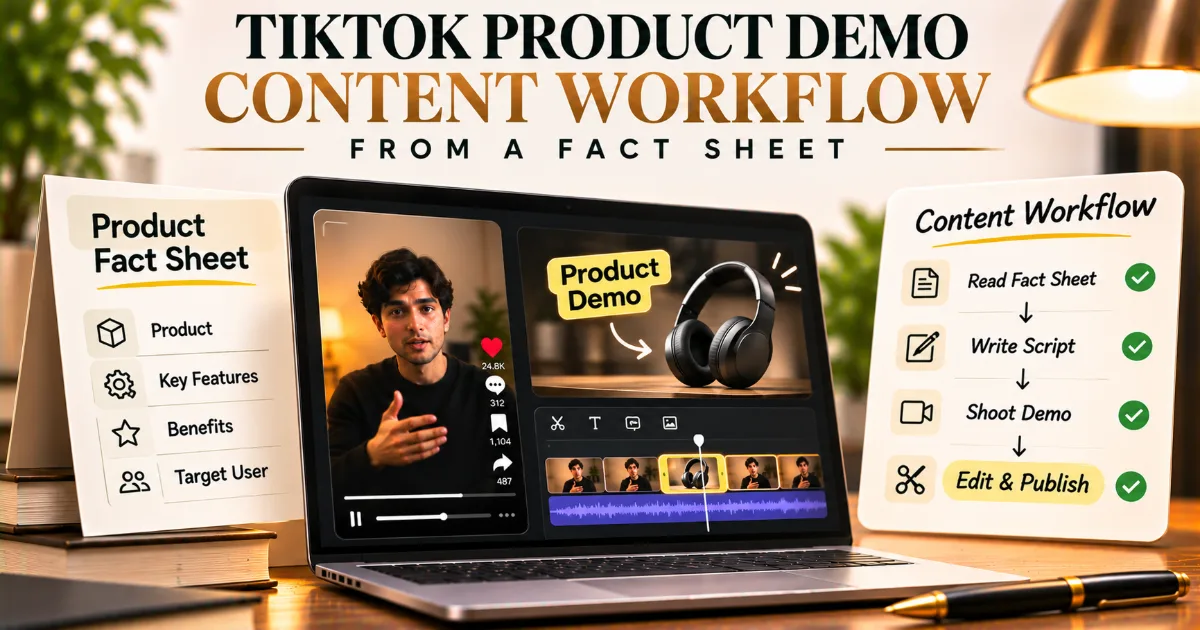
A TikTok product demo content workflow writes every demo script from one approved fact sheet, and the fact sheet includes what the product does not do. Each script shows one feature solving one problem, states the limit that applies to it, and cites the line of the fact sheet it came from. The demo is filmed on the real product, checked against the sheet, and labelled honestly where anything is simulated. This post walks through the fact sheet, the scripts, the filming and the checks, and follows one smart-thermostat maker from sheet to clips.
Who owns each step from a fact sheet to an approved product demo
- 01Product leadWrite the sheetfeatures, needs, limits and claims
- 02WriterDraft from itevery line cites the sheet
- 03PresenterFilm for reala typical setup, every step shown
- 04Product teamCheck and approvethe finished clip against the sheet
- TikTok product demo content workflow: the fact sheet comes first
- Why product demos overclaim
- Step 1: write the fact sheet, limits included
- Step 2: one feature, one problem, one clip
- Step 3: draft the script from the sheet, with citations
- Step 4: film the real product doing the real thing
- Step 5: label anything simulated or generated
- Step 6: check the clip against the sheet before approval
- A worked example: a smart-thermostat maker's demos
- What the workflow costs, and what it protects
- Frequently asked questions
- Where to start
TikTok product demo content workflow: the fact sheet comes first
A product demo is a claim the viewer can watch, which makes it more persuasive than a sentence and harder to take back. So the workflow starts not with a script but with a fact sheet: a short, approved document that says what the product does, what it needs to work, what it does not do, and which claims the business is willing to make in public. Every demo script is written from that sheet and nothing else. A demo regenerated from a real recording is audited against that recording too, the check described in our guide to a generated clip vs its source video.
Where demo scripts usually come from, and where they should
Drafted from memoryDrafted from the sheet
The product at its best
the product as the sheet describes it
What similar products usually do
what this product does and needs
The feature that just shipped
the feature with its stated limit
The order matters because demos drift in a predictable way. A marketer writing from memory remembers the product at its best, on the right setup, with the feature that has just shipped. A model drafting from general knowledge describes what products like it usually do. Both produce scripts that sound right and are slightly wrong, and on a demo the slight wrong is visible, because the viewer can see whether the thing on screen matches the words. Generated product shots drift the same way, toward a plausible product rather than the real one, which our guide to product visual accuracy in Higgsfield AI checks shape by shape and mark by mark.
This is the product version of a pattern that runs through every clip we build. Our TikTok FAQ video workflow grounds each script in an approved answer; this workflow grounds each demo in an approved fact sheet. For software products, our guide to content automation for SaaS covers the wider content system a product team runs, and the demo clips sit inside it. The same fact sheet keeps still images honest when a post needs several versions, as our guide to Higgsfield AI content variations shows for a repair shop.
Why product demos overclaim
Product demos overclaim because the camera only ever shows the best case: the device on the right system, the app on a fast connection, the feature without its conditions. Nothing in the clip is false, and yet a viewer who buys on the strength of it can find their own setup does not behave the same way. The limit that would have set the right expectation never made it into the script. A generated scene in a demo is at most a test candidate, compared on the same script as our guide to TikTok visual testing with Higgsfield AI describes, and never a stand-in for the product itself. A demonstration is one of the four kinds of content our guide to Higgsfield AI vs real video says must be a real recording.
How the product behaves beyond the best case the camera shows
Left to right: from the right setup to the buyer’s own
Bottom to top: how closely the product matches the demo
- the best case, and a setup that behaves differently
- what a buyer’s own setup does
TikTok's business rules state the line clearly for adverts. Its policy on misleading and false content says ad content "must not promise or exaggerate results concerning a product's effect," and restricts before-and-after comparisons that may give viewers a distorted impression of a product's results. TikTok's policy on deceptive practices adds unrealistic expectations about effectiveness to the list of what it does not allow.
An organic demo is not an ad, but it is judged by the same viewers, and a business that would not run a claim as an ad should not post it as a clip either. The practical fix is not caution in the edit; it is a fact sheet that puts the limits in front of whoever writes the script, so stating them is the default rather than an afterthought.
There is a commercial reason as well as an ethical one. A buyer who discovers a limit after purchase feels misled, however carefully the clip avoided saying anything false, and that buyer is the one who returns the product and tells others why.
Step 1: write the fact sheet, limits included
The fact sheet is one page per product with five sections: what it does, what it needs, what it does not do, the claims the business will make, and the claims it will not. It is written by whoever knows the product best and approved by whoever is accountable for what the business says about it. Each line has a reference, so a script can point to the exact line it used.
The five sections of a product fact sheet
- What it does
- each feature, stated plainly
- What it needs
- compatible systems, connections and setup
- What it lacks
- the limits a buyer should know
- Claims we make
- the approved wording for each benefit
- Claims we never make
- results, guarantees and comparisons ruled out
- The fact sheet
- one approved page every demo is written from
| Section of the fact sheet | What it holds | What it stops |
|---|---|---|
| What it does | Each feature, stated plainly | A demo of a feature that does not exist |
| What it needs | Compatible systems, connections, setup | A demo on a setup most buyers do not have |
| What it does not do | The limits a buyer should know | A viewer assuming more than the product offers |
| Claims we make | The approved wording for each benefit | A script inventing a stronger benefit |
| Claims we never make | Results, guarantees and comparisons ruled out | The overclaim that sounds harmless in a script |
The "claims we never make" section is the one most worth writing carefully. For many products it includes any specific saving, result or time frame that depends on the customer's situation, any comparison with a named competitor, and any "always" or "never" the product cannot guarantee. Writing those down once is far easier than catching them in every script. A generated product scene adds rights questions of its own, about the photos and logos fed in, which our generated media rights checklist for Higgsfield covers.
The same facts can describe the product on the website. Google's introduction to product structured data explains how product markup can appear in search results. When the clips, the product page and its markup all come from one approved sheet, they cannot contradict each other.
Step 2: one feature, one problem, one clip
Each demo shows one feature solving one problem a viewer recognises, because a clip that tours every feature teaches nothing and is remembered for nothing. The problem comes first, in the viewer's words; the feature follows as the answer; and the limit that applies to that feature is stated in the same clip, briefly and plainly.
What one product demo is built from
- 01The viewer’s problemin their own words, first
- 02One featureshown as the answer
- 03Its limitstated in the same clip
Relative, not measured
The brief for each demo has the same four fields as any clip: the viewer's problem, an opening that needs no context, one takeaway and one next step, set out in our TikTok video brief template. A demo adds two lines: the fact-sheet reference for the feature, and the limit the clip must state. If a feature has no limit worth mentioning, the brief says so, which is a decision rather than an omission.
One feature per clip also makes the series of demos easier to keep accurate. When a feature changes, only its clip needs reviewing, rather than every tour that happened to mention it. And a viewer who wants to know whether the product does one particular thing can find a clip about exactly that, which is how most people look at a product before buying: one question at a time, usually the one that decides whether it fits their situation. A set of those questions about one product can run as a series, and TikTok content series planning shows how to order them so each clip still stands alone.
The list of demos comes from the same research as any topic queue. Customer questions about a product are often questions about one feature, "can it do this?", and those make the best demos, because the viewer already has the problem. Our guide to the TikTok content research workflow describes how those questions are collected and ranked. Once demos are live, the questions under them come back through the TikTok comment research workflow, and the ones that keep recurring become candidate knowledge base entries.
Step 3: draft the script from the sheet, with citations
Draft each demo script from the fact sheet only, with each spoken line and on-screen label citing the sheet line it came from. A typical demo script is short: the problem on screen, a sentence naming the feature, the steps shown on the product, the result as the sheet describes it, and the limit. Anything not on the sheet comes out.
The instruction a model drafts each demo script from
The demo script brief
- 01Use only the approved fact sheet as your source
- 02Cite the sheet line behind every spoken line and label
- 03Start with the problem, then name the feature
- 04Show the steps and the result as the sheet describes them
- 05State the limit that applies to this feature
The citations can be generated rather than added by hand. Anthropic's documentation on citations describes a feature that returns the exact passages supporting each claim, so a model given the fact sheet as a document can return a draft with every line linked to its source. A reviewer then checks the draft against the sheet line by line rather than against their memory of the product.
The sheet can live wherever the team already keeps product documents. In n8n, the Google Docs node can read a document, so a workflow can pull the current approved sheet each time a script is drafted. That way a sheet updated on Monday is the sheet every Tuesday script is written from, without anyone copying text between files.
Step 4: film the real product doing the real thing
Film the demo on the real product, on a setup a typical customer would have, doing exactly what the script says, and show each step rather than cutting around it. A demo that cuts from the button press to the result hides the part a viewer most wants to see: how long it takes and what happens in between. Keep the steps, even when they are less exciting than the result.
What a demo shows, from the first tap to the result
Start
Setup — a typical homethe setup most buyers have
Step one
Tap — said aloudthe presenter names what they press
In between
Wait — shown, not cuthow long it really takes
Result
Outcome — as the sheet saysno stronger than written
Each step should be clear to someone who cannot hear the clip and to someone who cannot see it. Short on-screen labels name the steps, which TikTok's guide to editing, posting and deleting videos shows how to add. For viewers who cannot see the screen, the W3C's guide to description of visual information explains that visual information needed to understand the content, including text shown in the video, should be described, and that the simplest method is to include it in the speaker's script. A demo where the presenter says what they are tapping is accessible and clearer for everyone. A step shown with a generated image instead of a recording is held to the fact sheet in the same way, through a visual brief with a prohibited-claims line.
Nielsen Norman Group's guidance on video usability notes that video is helpful only if viewers understand what it contains, and it lists showing how a product works among video's strengths. That is the case for showing the real steps at a pace a viewer can follow: the demo's job is understanding, and understanding needs the middle of the process as much as the end.
Step 5: label anything simulated or generated
If any part of a demo is simulated, sped up, rendered or generated rather than filmed, the clip says so, on screen and in the post caption. A sped-up sequence is fine when it is labelled; a rendered animation of the product working is fine when it is labelled; neither is fine when a viewer would take it for real footage of the product doing what it does. TikTok may add the label itself, too: its newsroom post on advancing AI transparency explains that it reads Content Credentials attached to content made on some other platforms and labels that content automatically. The cutaways around a demo raise the same question, and our guide to Higgsfield AI vs stock footage explains why the product screen itself is always filmed rather than generated or licensed. Marking which frames are filmed and which generated is easiest at the storyboard stage, the step our Higgsfield storyboard workflow puts before any render.
How each kind of demo footage is labelled
Real footage in real time
A sped-up real sequence
A rendered product animation
A generated home scene
Across: how much of the footage was produced rather than filmed
Up: how much a viewer could mistake it for real time
TikTok's page on AI-generated content says it requires creators to label AI-generated content that contains realistic images, audio and video. A generated scene of a product in a home that does not exist falls squarely within that, and the label should be applied before posting rather than left to TikTok to detect. Our guide to the TikTok content approval workflow includes the AI label among the checks at the gate.
A demo by a business about its own product is also commercial content. TikTok's policy on regulated commercial activities says commercial content must be disclosed using the content disclosure setting, so the demo's record should note that the disclosure is on. A clip that shows the product honestly and is labelled as the business's own promotion is the kind of clip viewers can trust.
The other label a demo carries is commercial, and on TikTok the creator applies it rather than the platform inferring it. When a clip goes up through an app, TikTok's Content Sharing Guidelines offer a "Your brand" setting that tags the post as promotional content, and it stays off unless someone switches it on. A demo of the business's own product is the plainest case for it, so the approval record in step 6 notes that the setting was chosen, by whom. TikTok's guide to turning on the commercial content disclosure setting says the setting must be switched on whenever a post promotes a brand, product or service.
Step 6: check the clip against the sheet before approval
Before approval, someone compares the finished clip, not just the script, with the fact sheet: every spoken claim, every on-screen label, the steps shown, the result shown and the limit stated. The clip is checked rather than the script because things change between them. A presenter improvises a sentence; an editor trims a step; a label is shortened until it says more than it should.
A finished demo before and after its check against the sheet
- 01Claims sourced
- 02Typical setup
- 03Steps shown honestly
- 04Limit stated
- 05Simulation labelled
- the clip as first cut
- the clip after the sheet check
A judgment, not a score
The check asks five questions. Is every claim on the sheet? Is the setup one the sheet says the product works with? Are the steps shown as they happen, or clearly labelled where they are sped up? Is the limit stated? Is anything simulated labelled? A clip that fails any of them goes back to the editor with the sheet reference that shows why. The upload adds one more check of its own, since TikTok's guide to creator tools on TikTok describes running a copyright check on a video's sounds when it is uploaded in TikTok Studio.
The check is quicker than it sounds, because the script already carries its citations and the clip mostly follows the script. The reviewer watches once with the sheet open, ticks each claim against its line, and notes anything new the presenter said on camera. Improvised lines are the most common finding: a presenter who knows the product well adds a helpful remark that is true in their experience but not on the sheet. Either the remark is added to the sheet, after approval, or it is trimmed from the clip.
The product team then approves the clip, because they are the ones accountable for what it says about the product. Their approval is recorded against the exact file and the sheet version the clip was checked against, so that if the sheet changes, every clip that used the old version can be found. Our guide to the TikTok content refresh workflow covers what happens to those clips.
A worked example: a smart-thermostat maker's demos
Take an illustration, not a client: a company that makes a smart thermostat wants a run of TikTok demos. Its product lead writes a one-page fact sheet: what the thermostat does (schedules, an away mode, room-by-room sensors), what it needs (a compatible heating system and a home Wi-Fi connection), what it does not do (it does not work with some older systems, and it cannot make a poorly insulated home warm), the approved wording for each benefit, and a firm line that no clip quotes a specific energy saving, because savings depend on the home.
What the thermostat maker’s three demos needed before approval
Three demos
- A rewritten claim away mode promised a lower bill
- Labels added a sped-up section and a rendered close-up
- Approved as cut the schedule demo matched the sheet
Rough shares — a shape, not a measurement
Three demos are briefed, one per feature, each starting from a question customers ask. The away-mode demo is drafted from the sheet with citations. The first draft says the thermostat "will cut your heating bill", which is not on the sheet and breaks the no-savings line; it goes back and becomes "turns the heating down while you're out, using the schedule you set". The limit, compatible systems only, is stated in the clip and a link to the compatibility checker is in the description.
The room-sensor demo is filmed in a real flat over a real afternoon, with a short sped-up section labelled "sped up" on screen. A rendered close-up of the sensor's internals is labelled as an animation and the AI-generated content label is applied, because it was produced with a generation tool. The product lead checks each finished clip against the sheet, approves all three, and the clips' records note the sheet version. When the sheet is later updated with a newly compatible system, the records show which clips mention compatibility.
What the workflow costs, and what it protects
The fact sheet is the main cost: a few hours for the product lead to write and get approved, and a short review whenever the product changes. After that, each demo costs a brief, a cited draft, a filming session and a check. The check is the cheapest part of the whole workflow and the one that prevents the most expensive mistake: a public clip the business has to correct.
What the workflow protects is trust in the product's own claims. A demo that matches what buyers experience makes the next demo more believable; one that oversold makes every later clip look like marketing. That is also why the sheet's "claims we never make" section is worth defending when a draft wants to break it. Our guide to the TikTok video rights checklist covers the other set of checks a demo needs, for music, footage and any customer who appears. Before either, the TikTok clip quality checklist asks whether the demo reaches its result early enough, and sends it back for a re-record if it does not.
The failure to watch for is the sheet that falls behind the product. A feature ships, the demos follow quickly, and the sheet is updated later, if at all. Make updating the sheet part of shipping the feature. A demo is one kind of clip TikTok content automation handles; FAQs, case studies and founder clips get write-ups of their own in our TikTok content guides, and our multi-platform content guides show how a recording is prepared for more than one platform.
Frequently asked questions
What is a TikTok product demo content workflow?
It is a process for making product demo clips that only show and say what the product really does. It starts from one approved fact sheet that includes the product's limits, writes each demo script from that sheet with citations, films the real product on a typical setup, labels anything simulated, and checks the finished clip against the sheet before approval.
What should a product fact sheet include?
Five sections: what the product does, what it needs to work, what it does not do, the claims the business will make in public, and the claims it will never make. Each line has a reference so a script can cite it, and the sheet is approved by whoever is accountable for what the business says about the product.
Should a product demo mention the product's limitations?
Yes, the limit that applies to the feature being shown, stated briefly in the same clip. A demo only shows the best case, so the limit sets the right expectation for a viewer whose setup may differ. TikTok's ad policies restrict exaggerated product claims, which is a sensible standard for organic demos too.
Can I speed up or animate parts of a TikTok demo?
Yes, as long as the clip says so. Label sped-up sections on screen, label rendered animations as animations, and apply TikTok's AI-generated content label to realistic generated images, audio or video. What matters is that a viewer never takes simulated footage for the product working in real time.
Can AI write product demo scripts?
A model can draft them well if it is given the approved fact sheet as its only source and asked to cite the line behind each claim. A person should check the draft, and later the finished clip, against the sheet, because spoken improvisation and editing can change what a demo says.
What happens to old demos when the product changes?
Each clip's record keeps the version of the fact sheet it was checked against, so when the sheet changes, every clip that used the old version can be found and reviewed. Updating the sheet should be part of shipping a change, so demos never get ahead of it.
Where to start
Write the one-page fact sheet for your best-selling product, and spend most of the time on two sections: what it does not do, and the claims you will never make. Then take your last demo and check it against the sheet line by line. If it states a claim that is not on the sheet or leaves out a limit that applies, you have found the gap this workflow closes. For the footage under the steps, our TikTok B-roll planning workflow covers shots that clarify rather than decorate, and our post on TikTok on-screen text covers the step labels. The fact sheet is one record among several, and how those records feed every TikTok clip is mapped in a Content Operating System for TikTok.
Disclosure
This post was written by Shreyas Dave, founder of Paper Eagle AI. We sell content automation services, which is the category this article is about, so we have a commercial interest in you concluding that a system beats ad-hoc effort — read it knowing that. No tool vendor was involved in writing it, nobody paid for a mention, and there are no affiliate links anywhere on this site. Where a third-party figure appears, it’s attributed to the publisher it came from; anything we couldn’t source is written as a direction rather than a number.
Paper Eagle AI builds Content Operating Systems that turn a business’s knowledge and expertise into consistent, multi-platform content, and we deliver them as content automation services. Working as a content automation specialist, we capture what a business knows and how it sounds, set the strategy, and build the workflows that research, draft, repurpose and publish — with a named person approving every piece before it goes out. Every build runs through discovery, design, build and handoff. The system lives in the client’s own accounts, it is documented, the team is trained to run it, and the business owns it outright. We don’t write content on a retainer, and we don’t build lead generation, CRM or sales automation.
One source of thinking becomes native content for every platform a business publishes on: the founder’s LinkedIn and the company page, YouTube and Shorts, Instagram and Reels, TikTok, Reddit, Medium, newsletters, and the company’s own website, written to be found in Google and understood by AI search. Our multi-platform content automation page shows how they share one source, and our case studies document the systems behind our own publishing, file by file. You can follow the work on the company’s own channels: Paper Eagle AI on Instagram, Paper Eagle AI on YouTube, the Paper Eagle AI company page on LinkedIn, Paper Eagle AI on Substack, Paper Eagle AI on Reddit and Paper Eagle AI on Medium. Paper Eagle AI is also listed where clients can review its work: Paper Eagle AI on Clutch, Paper Eagle AI on GoodFirms and the Paper Eagle AI Google Business Profile.
Keep reading
- Content automation for SaaS — the wider content system a product team runs.
- TikTok FAQ video workflow — the same grounding idea applied to customer questions.
- What goes into a business content knowledge base — where the fact sheet sits among the business's approved knowledge.