How to Choose Content Tools for Your Content OS
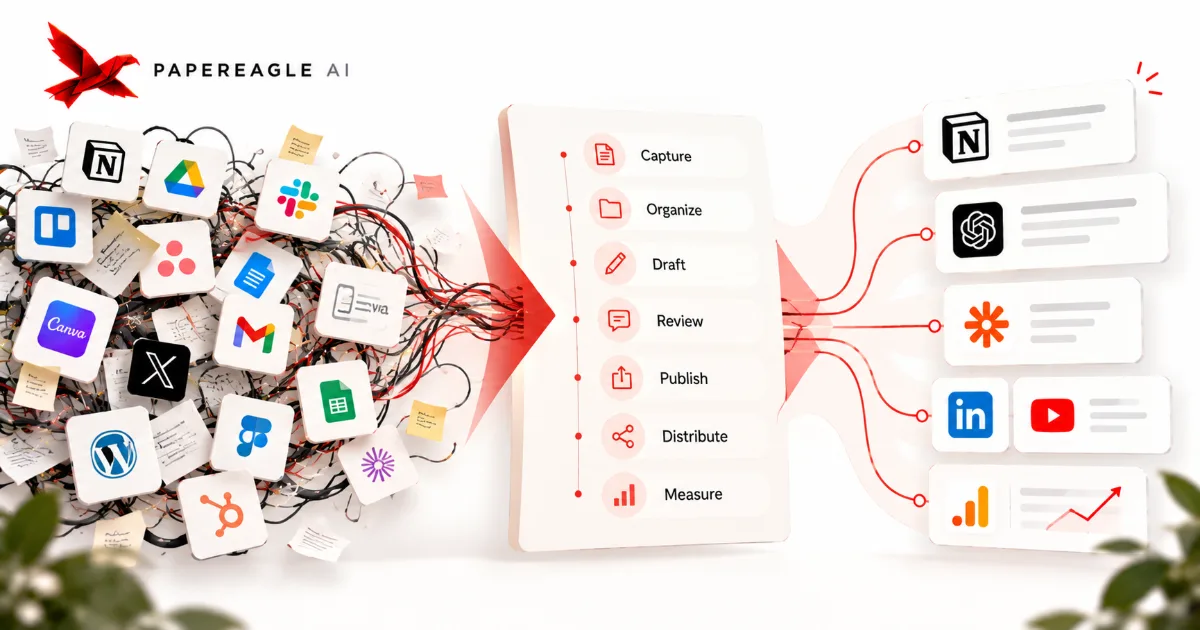
There are more content tools than anyone could ever use, and a new one launches every week promising to change everything. That abundance is exactly the problem. Faced with it, most businesses shop for tools and then bend their work to fit — which is how you end up paying for eleven subscriptions that don't talk to each other and still doing the hard part by hand. There's a better order of operations, and it starts by refusing to shop at all.
One business, one content problem, two orders of operations
Tools first · the common order
- A demo looks good, so the subscription starts.
- The work bends to match what the software does well.
- The gaps it leaves get a tool of their own, later.
- You end up with a stack nobody designed.
Process first · the working order
- You draw how content already moves through the work.
- Each step gets named as a job the system has to do.
- A tool is judged against one named job, or it isn't bought.
- You end up with a stack you can explain.
- The mistake almost everyone makes
- Design the process, then choose the tool
- The seven jobs a content system has
- Five questions to ask any tool
- How few tools you actually need
- A worked example: one job, done properly
- The tools we build with, and why
- How sprawl happens, and when a tool earns its place
- What doing this properly actually costs
- Frequently asked questions
- Where to start
The mistake almost everyone makes
The mistake is choosing the tool first. You see a slick demo, a competitor's stack, a list of the year's twenty best tools, and you buy. Then you shape the work around what the software happens to do well. Bit by bit your process becomes an accident of the tools you bought rather than a deliberate design, and nobody ever sat down and decided it should work that way. It isn't carelessness — it's the natural result of the only decision anyone asked you to make being "buy, or don't buy."
How a stack grows when nobody is deciding
a demo, a competitor's stack, a list of the year's best tools
buying feels like solving, and month one asks almost nothing of you
the process quietly becomes whatever the software does well
the bent process no longer meets the tool sitting next to it
It feels productive, because buying a tool feels like progress. But a tool is only ever an answer to a question, and if you haven't asked the question you have no way to judge the answer. What you get is a stack that grew by accretion: each tool solved a moment's problem, none of them was chosen against a plan, and together they add friction instead of removing it.
You can usually hear the problem in how a team talks about its own software. Nobody says "we use this for that." They say "we sort of use it, mostly for that, though the real version lives in the spreadsheet." Every "sort of" is a job no tool actually owns, being carried instead by somebody's memory. Those are the jobs that break the week someone is on holiday.
We hold a simple belief about this: technology is a tool, never the goal. Software should serve a process you have already thought through. The moment the tool leads and the thinking follows, you have handed the design of your business to a product manager who has never met you.
Design the process, then choose the tool
The fix is to reverse the order. Before you look at a single product, map how content actually moves through your business: where ideas come from, who turns them into drafts, who reviews, how things get published, where they're distributed, and how you learn whether any of it worked. That map is your process. It exists whether or not you have ever drawn it — the only real choice is whether you design it on purpose.
The order that makes choosing a tool boring, in the best way
- 01Drawhow content moves today, honestly
- 02Nameeach step as a job to be done
- 03Testcandidates against one job each
- 04Wirethe handoffs between what's left
Drawing it is less work than it sounds, and it needs no software at all. A sheet of paper and twenty minutes with the two or three people who actually touch the work will get you most of the way there. You're not after a beautiful diagram; you're after the list of moments where something moves from one person, or one place, to another. Those moments are where stacks fail, and they never appear in a demo, because a demo only ever shows one tool doing its own job well.
Once the process is on paper, tool selection gets almost boring. Each candidate is now judged against a specific job the process needs done. You are no longer asking "is this a good tool?" — an unanswerable question — but "does this do this job, for my team, at my scale?" That question has a real answer, and usually a fast one. Half the products you were agonising over turn out not to be answering your question at all.
This is why Paper Eagle AI designs the system before choosing any software in a Content OS build. The workflow is the decision; the tools only implement it. And because the workflow is written down somewhere other than in a product, replacing one tool later costs an afternoon rather than a rebuild.
The seven jobs a content system has
Strip away the branding and almost every content system does the same seven jobs. It captures raw material — ideas, expertise, the questions that come up in real conversations. It organizes that material so it can be found and reused. It drafts. It reviews and refines. It publishes. It distributes to the channels that matter. And it measures what happened, so the next round starts smarter than the last one did.
Every content system, stripped back to the work it has to do
raw material in, in a form you can find again
- Capture
- Organize
material becomes something worth publishing
- Draft
- Review
it goes out, and you learn what happened
- Publish
- Distribute
- Measure
That is the whole shape. Notice how few jobs there are, and how many products claim to own each one. Most of the market is selling variations on the same seven functions with different opinions attached — and you need a tool for a job only when the job is genuinely unserved, not because a category exists and your stack has nothing in it. "We don't have a content operations platform" is not a problem. "Nobody can find last quarter's research" is.
Some of these jobs collapse into a single tool. Some need no tool at all, only a document and a habit: review is very often just a person, a comment thread and a rule about who has the last word. The point of the list isn't to go and buy seven things. It's to have something concrete to hold any product against and ask plainly — which of these does this actually do, and do I need it done better than it is being done now?
The list works as a diagnostic too. Read down it and mark the jobs nobody owns. In the businesses we see, the two that go unowned most often are organizing what you know and measuring what it did — the two that produce nothing you can point at on the day you do them, and everything you rely on a year later. A gap there is usually worth a tool. A gap at draft almost never is, because drafting is the job every business is already doing somehow.
Five questions to ask any tool
When a tool is genuinely on the table, five questions settle most decisions. Ask them in this order and stop at the first honest no. The order is doing real work: the cheap questions come first, so most candidates are resolved before you have spent an afternoon on them.
Three candidates for one job, run through the five questions in order
A dedicated scheduling platform stops at question three
An all-in-one marketing suite stops at question two
One automation between tools you own clears all five
Questions cleared before the first honest no — a judgment, not a score
What job does this do? Name the specific job from your process. If you can't name one, you don't need the tool — you're shopping. Can my team actually use it? A powerful tool your team half-understands is worse than a simple one everyone uses fluently. Match the tool to real skill, not aspirational skill. Does it fit the tools I already have? A tool that connects cleanly to your stack is worth more than a marginally better one that becomes an island. Does it remove work or add it? Every tool has a maintenance cost — setup, upkeep, the mental overhead of one more login. It has to pay that back in saved effort. Will it still fit at next year's scale? Not ten years out, but the scale you can actually see. A tool you'll outgrow in a quarter isn't a decision; it's a delay.
Run a real choice through them and watch how fast they cut. Say you're tempted by a dedicated social-scheduling platform. Question one: the job is "schedule and queue posts across three channels" — fine, that's real and specific. Question two: your team already lives in the tool they draft in and would have to learn another dashboard, which is a mild no. Question three: it doesn't connect to where the content is created, so posts would be copied across by hand — a real no, and you can stop there. The honest answer is that one automation between the tools you already run does the same job with less to maintain. Five questions, two minutes, one subscription you didn't buy.
Notice what would have happened had you started at the other end. Question five — will it scale? — sends you off reading about seat limits and usage tiers for a tool you were never going to keep. Feature comparison is the most expensive way to make this decision, and it's the one every buying guide recommends. Fit with what you already own is cheap to check and eliminates most candidates in a sentence.
The same five questions, with what a good answer sounds like and the red flag that should stop you:
| Ask | Green flag | Red flag |
|---|---|---|
| What job does it do? | Names one specific job in your process | "It does everything" / you can't name the job |
| Can my team use it? | Your team is fluent in a week | Needs a specialist you don't have |
| Does it fit my stack? | Connects to what you already run | Becomes an isolated island of data |
| Does it remove work? | Nets out less effort than before | Adds a thing to maintain and babysit |
| Will it fit next year? | Room to grow at foreseeable scale | You'll outgrow it within a quarter |
How few tools you actually need
Here's the claim that surprises people: most content systems run well on three or four tools, not twenty. Somewhere to keep organized knowledge. Something to create and edit in. Something to publish and schedule. Usually something to automate the handoffs between them. That's a working system for a great many businesses, and it isn't a compromise or a starter kit — it's what a designed stack tends to look like when nothing was bought without a reason.
Two stacks doing exactly the same seven jobs
Relative, not measured
The instinct to add more usually isn't about capability. It's the feeling that a serious operation ought to have an impressive stack. The opposite is true: simplicity is sophisticated, and a lean stack everyone understands beats a sprawling one nobody fully controls, every time. Fewer tools mean fewer integrations that can break, fewer logins to manage, and fewer places for the process to spring a leak.
There's a second-order effect that's easy to miss. Every tool you add multiplies the number of connections that could exist between the things you own, and each of those connections is either built — and then maintained — or missing, and crossed by hand. A handful of tools has a manageable number of seams. A dozen has far more than anyone will ever wire up, which is exactly why large stacks end up held together by copying and pasting.
So start from the smallest stack that does the jobs, and make every addition earn its place against a job you can name. Subtraction is a strategy, not a failure to shop hard enough.
A worked example: one job, done properly
Abstract advice is easy to agree with and hard to apply, so here is one real job, start to finish. The job: every week, an approved draft has to get from where it was written to where it gets published, with its title, category and canonical link intact. Right now a person does it by hand on a Tuesday morning, and roughly once a month they forget the canonical link and nobody notices for a fortnight.
Thursday morning · wiring the weekly publish handoff in Claude Code
- >Build the publish handoff: approved drafts in content/approved/ go to the CMS as a draft post.
- ·Read content/workflow.md — three approval states, one reviewer, publishing happens on Tuesdays.
- ·Front matter carries title, slug, category and canonical on every file. Two of eleven are missing a category.
- +Created publish-handoff.json — an n8n workflow, six nodes, watching the approved folder.
- ·Waiting on you: those two files. Set a category by hand, or default a missing one to Content OS?
- Elapsed · about 40 minutes · output: one workflow, one job off the weekly list
The tool-first instinct here is to go looking for a content platform that does drafting and publishing in one place. Run that through the five questions and it dies at question three. The drafts live in a repository alongside the knowledge they were built from, and moving them into a platform would mean giving up the thing that makes them good in order to fix a ten-minute handoff. That trade is obvious once it's written down, and completely invisible while you're watching a demo of a very nice editor.
So the job gets named properly — "move an approved file into the CMS as a draft post, with its fields mapped" — and answered with what's already there. Claude Code already sits in the files, working across a whole repository rather than one file. n8n watches the approved folder — a trigger self-hosted n8n has and the cloud version doesn't — reads the front matter, maps the fields and creates the post. Zapier or Make.com would do the same job; the differences between the three are about fit, not capability, and we reached for n8n because this client already runs it. The whole thing is six nodes and it was built in a morning, as the session above shows.
Note what didn't happen. No new subscription, no migration, no retraining, and no argument about which tool is now the source of truth. A handoff that used to cost ten minutes a week and an occasional missing link is now a workflow anyone can read. And because the process was written down before any of it was built, the day n8n stops suiting this business, the same six steps get rebuilt somewhere else in an afternoon. That is what it means for the tools to be replaceable: not that they're disposable, but that the thinking doesn't live inside them.
The tools we build with, and why
When we build systems for clients we tend to reach for a small set: Claude Code, n8n, Zapier and Make.com. The important part isn't the names — it's the reasoning. We choose them because they connect cleanly to almost anything, they automate the dull handoffs between steps, and they don't lock a business into one vendor's idea of how work should flow. None is free of upkeep — self-hosted n8n is a service you run yourself — which is what question four asks.
The stack we reach for, and the job each part actually does
- Claude Code
- Works inside the files where the knowledge already lives, so organizing and drafting happen in one place
- n8n
- Runs the handoffs on infrastructure the client controls, where a workflow can be read, versioned and moved
- Zapier
- Connects the long tail of apps that will never justify a proper integration of their own
- Make.com
- Handles the branching, multi-step routes that would be brittle as a chain of simple triggers
- In one line
- Four tools, four named jobs — and every one of them replaceable without redesigning the process
Even so, we never start with the tools. We design the process first, then reach for whichever of these serves it — and when a client's process is better served by something else, we use that instead. Plenty of the systems we build have a spreadsheet in them, because for that business, at that size, a spreadsheet was the honest answer. The stack is a consequence of the design, not the design itself. That order is the whole discipline.
It's also why we're relaxed about tools changing. Any one of these four could be replaced next year by something better, and none of that would touch the process documents, the naming, the review rules or the pillars — the parts that took the actual thinking. A business whose system lives in its tools has to redesign every time it re-buys. A business whose system is written down just re-implements.
So treat our stack as an example of the reasoning, not a shopping list. If you want to see how this fits into a complete system, it's part of what we build.
How sprawl happens, and when a tool earns its place
Tool sprawl rarely arrives as one bad decision. It accumulates. Someone trials a tool for a project and it lingers. A new hire brings their favourite. A one-off need gets a permanent subscription. Six months later you're maintaining a dozen tools, half-using most of them, and paying for the privilege of a workflow no one designed.
Eighteen months of a stack that nobody audited
Left to right: about eighteen months
Bottom to top: things you have to maintain
- Jobs the system actually has
- Tools the business is paying for
What makes it so hard to reverse is that adding is somebody's decision and removing is nobody's. Every tool on the list was championed by a person, so taking one away means telling that person their thing is going — a conversation with no obvious owner and no deadline. That's why the fix has to be a scheduled event rather than good intentions.
The cure is a standing rule and a date in the calendar: no tool without a named job, and twice a year, a list of every tool with the job it does written beside it. Anything you can't defend in one sentence gets cut. It feels like housekeeping. It's strategy — every tool you remove is one less thing that can break, distract or drift.
None of this means never add anything. Systems grow, and sometimes a real gap opens that your current stack genuinely can't fill. The signal is a specific, recurring pain that points at a named job — not a demo that looked exciting on a Tuesday. "We keep losing track of which draft is current" is a signal. "This looks useful" is not. The difference is that the first one names a job and the second one names a feeling.
When the signal appears, try to do the job with what you already own first; you'll often find you can, and when you can't, the attempt tells you precisely what's missing — which makes the next evaluation take minutes instead of a fortnight. Then run the candidate through the five questions, add it deliberately, and write down the job it was hired to do. That sentence is what you'll read at the next audit, and it's the whole difference between a tool that earned its place and one that merely survived.
What doing this properly actually costs
It would be dishonest to present this as free. Designing a stack properly costs real attention, and the bill arrives before any of the benefit does — which is the main reason so few businesses do it. Here's what it actually takes for a business with one or two people who touch content regularly.
What choosing a stack properly costs, from the ground up
The base layer is the one people skip and the only one that can't be. Half a day with the people who do the work, drawing how content really moves rather than how the handbook says it moves. It's unglamorous and it produces nothing demonstrable. Everything above it gets faster because of it — and every business we've seen that skipped it ended up doing it later anyway, halfway through a migration, under time pressure.
The middle layers are cheaper than people expect. Naming the jobs takes an hour once the map exists, because the map has already done the thinking. Testing candidates takes about a week of elapsed time, most of which is waiting rather than working: you're using each one on a real piece of work instead of reading a comparison article, because watching someone work through a real task beats any feature matrix. Wiring the handoffs takes a day, and with an agent doing the building it's frequently less — the session earlier in this post is a fair sample of what that looks like.
Then there's the layer that never ends, and it's an hour a quarter. Read the list, name the job each tool does, cut what you can't defend in a sentence. That hour is what keeps a stack the size it should be. Skip it and you'll be back at the top of this article in eighteen months, wondering how you ended up with eleven subscriptions again — and this time with a year and a half of data trapped in tools you don't use.
Set against that, the cost of not choosing deliberately is easy to underestimate, because it's never billed in one place. It's the ten minutes every week, the draft that got published from the wrong version, the report nobody runs because it lives in the tool only one person logs into. None of it looks expensive on the day. All of it compounds.
Frequently asked questions
How many content tools do I actually need?
Fewer than you think — three or four is enough for most businesses. You need somewhere to keep organized knowledge, something to create and edit in, something to publish and schedule, and usually something to automate the handoffs between them. Everything else is an addition you justify one at a time, not a default you adopt because a competitor uses it.
Should I choose my tools before or after designing my process?
After, always. Design the process first — what gets captured, created, reviewed, published, distributed and measured, and by whom — then choose tools to serve that process. Choosing tools first quietly forces your workflow to fit the software's assumptions instead of your business's needs, and you rarely notice it happening until the stack is too big to unpick.
What jobs does a content system actually have to do?
Seven: capture, organize, draft, review, publish, distribute and measure. Nearly every product on the market is a variation on one or more of those seven, which is why the list is more useful than any comparison table. Go down it, mark the jobs nobody currently owns, and you have your shortlist of what to actually look for.
Are more expensive or more popular tools better?
Not inherently. The best tool is the one that fits your process, your team's real skill level, and the scale you actually operate at. A popular enterprise platform your team never fully uses is worse than a simple tool everyone understands, because the gap between what it can do and what you do with it is pure maintenance. Fit beats features.
How do I know when to add a new tool?
Add a tool only when a specific, recurring pain points at a job your current stack genuinely can't do. "We keep losing track of which draft is current" is a signal; "this looks useful" is not. If the pain is real, name the job, try to solve it with what you already own first, and only then add software — a tool should remove work, not add a new thing to maintain.
How long does it take to choose a content stack properly?
About a week and a half of elapsed time, and far less than that in actual work. Half a day to draw how content moves through your business, an hour to name the jobs, roughly a week of testing candidates on real work rather than reading comparisons, and a day to wire the handoffs. After that it is an hour a quarter to keep the stack the size it should be.
Should I replace my whole stack at once, or one tool at a time?
One at a time, starting with the job that hurts most. A wholesale migration means every part of your process is unfamiliar in the same week, which is when teams quietly revert to the old way. Because the process is written down before any tool changes, swapping one part is a contained decision rather than a rebuild — and you keep working the whole time.
Where to start
Don't start by comparing tools. Start by drawing how content actually moves through your business, from raw idea to published, distributed and measured. Give it half a day and the two or three people who touch the work. Once that map exists, the tool questions answer themselves — and you'll almost always need fewer tools than you feared.
The goal was never an impressive stack. It was a system that quietly does its seven jobs, with as little software as possible standing in the way, and with the thinking stored somewhere no vendor can take away.
If you'd rather not assemble this yourself, that's content automation specialist work — the same tools, wired into one system with Claude Code and n8n.
Disclosure
This post was written by Shreyas Dave, founder of Paper Eagle AI. We sell content automation services, which is the category this article is about, so we have a commercial interest in you concluding that a system beats ad-hoc effort — read it knowing that. No tool vendor was involved in writing it, nobody paid for a mention, and there are no affiliate links anywhere on this site. Where a third-party figure appears, it’s attributed to the publisher it came from; anything we couldn’t source is written as a direction rather than a number.
Paper Eagle AI builds Content Operating Systems that turn a business’s knowledge and expertise into consistent, multi-platform content, and we deliver them as content automation services. Working as a content automation specialist, we capture what a business knows and how it sounds, set the strategy, and build the workflows that research, draft, repurpose and publish — with a named person approving every piece before it goes out. Every build runs through discovery, design, build and handoff. The system lives in the client’s own accounts, it is documented, the team is trained to run it, and the business owns it outright. We don’t write content on a retainer, and we don’t build lead generation, CRM or sales automation.
One source of thinking becomes native content for every platform a business publishes on: the founder’s LinkedIn and the company page, YouTube and Shorts, Instagram and Reels, TikTok, Reddit, Medium, newsletters, and the company’s own website, written to be found in Google and understood by AI search. Our multi-platform content automation page shows how they share one source, and our case studies document the systems behind our own publishing, file by file. You can follow the work on the company’s own channels: Paper Eagle AI on Instagram, Paper Eagle AI on YouTube, the Paper Eagle AI company page on LinkedIn, Paper Eagle AI on Substack, Paper Eagle AI on Reddit and Paper Eagle AI on Medium.
Keep reading
- What is a Content OS? — the complete system your tools are meant to serve.
- How to conduct a content audit — take stock of what you have before you change how you make it.
- What to automate in your content — decide what the stack should do before you choose it.