Content Creation with Claude Code and Higgsfield
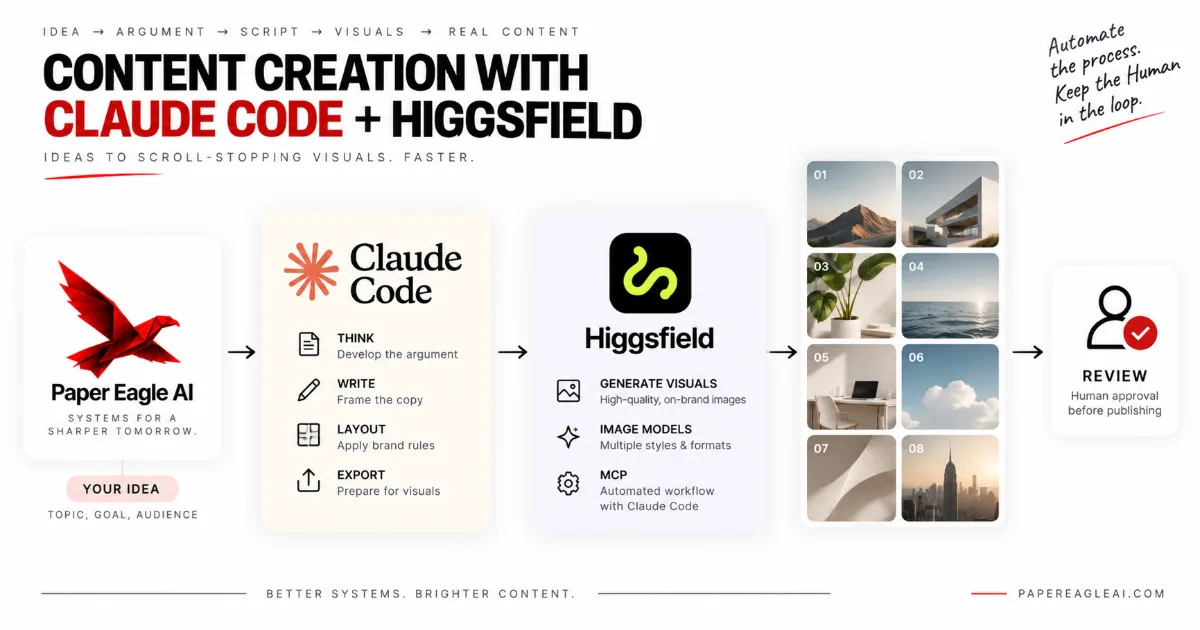
Connecting Claude Code and Higgsfield gives a carousel workflow the one thing a text-only AI setup cannot make: a strong image on every frame. Claude Code does the thinking and the layout — the argument, the words on each slide, your brand rules, the final export — and Higgsfield, reached through its MCP server, generates the pictures those slides need. The result is not a slightly better carousel. It is a different kind of carousel, one that holds its own in a visual feed, made without filming a single video. This post explains what each tool does, how the connection actually works, how to set it up, a full worked example, and what it honestly costs.
One idea to one finished carousel, and which tool does each stage
- 01Decideyou pick the point the carousel makes
- 02WriteClaude Code drafts every frame, in your voice
- 03PictureHiggsfield generates the visuals, over MCP
- 04AssembleClaude Code sets type over image and exports
- 05Approvea person looks at every frame before it posts
- What does connecting Claude Code and Higgsfield actually do?
- What a carousel made with Claude Code alone looks like
- What Higgsfield adds to a carousel
- Claude Code alone vs. Claude Code with Higgsfield
- How the Higgsfield MCP connection works
- Setting up Higgsfield in Claude Code, step by step
- A worked example: how to make carousels with AI, end to end
- An AI carousel generator for people who never want to make a video
- What it honestly costs
- Frequently asked questions
- Where to start
What does connecting Claude Code and Higgsfield actually do?
Connecting Claude Code and Higgsfield turns one Claude Code session into a studio that can both write a carousel and paint it. Claude Code, Anthropic's agentic coding tool, already reads files, follows written rules and builds things; Higgsfield, the AI image and video generation platform, gives it access to image models it could never run on its own. The link between them is a standard connection rather than a custom integration, so nothing about it is exotic: Claude Code asks for a picture the way it would ask any tool for anything, and gets a file back.
The connection, stated field by field
- Claude Code does
- The argument, the frame-by-frame copy, the brand rules, layout and export
- Higgsfield does
- Generates the images each frame asks for, in the ratio it asks for
- Joined by
- Higgsfield's hosted MCP server, signed into with your own account
- Inputs
- Your idea, your voice file, your visual style file
- Outputs
- Finished carousel frames, sized for the platform, ready for review
- Stays human
- What the carousel says, and whether it goes out
- In one line
- Claude Code sets the words; Higgsfield paints the picture behind them
The practical effect is that the question "what goes on this slide?" gets a complete answer inside one conversation. Before, a carousel built with AI was usually two jobs in two places: words drafted in one tool, then carried by hand into a design app and matched with stock photos or a template. Every carousel paid that carry-over cost again. With the two connected, the session that wrote slide four also asks for slide four's picture, places it, and moves to slide five.
This is the same idea behind everything we build, applied to a single format: remove the repetition between the decision and the published piece, and leave the decision with a person. If Claude Code itself is new to you, start with Claude Code for content automation, which covers the files and habits this whole workflow rests on.
What a carousel made with Claude Code alone looks like
A carousel made with Claude Code alone is a well-set document: strong type, clean hierarchy, rules and simple diagrams, all built in HTML and exported as images. That is a real capability and it should not be undersold. Claude Code can write the argument, lay it out on a 1080 by 1350 frame, apply your fonts and colours exactly, draw a table or a flowchart out of boxes and lines, and export the whole deck in one pass, the same way every time.
Where a Claude Code-only carousel is strong, and where it runs out
Relative, not measured — the shape of the tool's strengths, not a benchmark
That last bar is the whole story. A language model can describe a sunlit desk in perfect detail, and with no image model attached it can only put the description on the slide as words. So a Claude Code-only carousel has two honest options for its visuals: go without, which gives you a typographic deck, or reach for stock photography and generic icons, which gives you the look every other account in the feed already has. Neither is a failure. Both are a ceiling.
We say this with some self-awareness, because our own Instagram carousels are deliberately made of type and diagrams — a technical sheet is our visual brand, and that was a choice. For a framework, a checklist or a comparison, type alone often reads as more serious, not less. The trouble starts when the point of the carousel is a feeling, a scene, a product or a person, and the frame has nothing to show it with. That design law is also what makes the Instagram branch of a multi-platform content pipeline cheap enough to run every week.
What Higgsfield adds to a carousel
Higgsfield adds the layer a text-only workflow is missing: generated imagery, chosen by the same session that wrote the slide. According to Higgsfield's page on its MCP server for Claude, the connection exposes a range of leading image models, supports the ratios a carousel actually uses — 1:1, 4:5, 3:4, 9:16 and 16:9 — and renders at far higher resolution than a feed will ever display, as of September 2026. For a carousel that means a frame can carry a scene, a product in use, a mood or a recurring character rather than a flat colour.
The four layers of one carousel frame, and which tool makes each
The difference shows up in three places. The first is attention: in a feed of photographs and video, a frame with a strong image is competing on equal terms, while a frame of type is asking to be read before it has earned it. The second is range. A typographic system gives every carousel a family resemblance, which is good for brand and bad when fifty posts in a row look alike; generated imagery lets the same brand frame hold a different scene every week. The third is specificity. Stock photography shows a generic laptop; a generated image can show the exact situation the slide describes, because the prompt was written by the session that wrote the slide.
There is one design rule that makes or breaks this, and it is shown in the figure above: ask Higgsfield for pictures with no words in them, and let Claude Code set every word as real type on top. Image models have become much better at lettering, but they can still misspell, warp or invent a word, and a headline baked into pixels cannot be corrected, translated or read aloud by a screen reader. Real type over a generated image is sharper, cheaper to fix, and always says exactly what you approved.
Claude Code alone vs. Claude Code with Higgsfield
The honest summary is that Claude Code alone makes carousels people read, and Claude Code with Higgsfield makes carousels people stop for and then read. The writing, the rules and the export are the same in both. What changes is whether the frame has a picture that does work before the first word is read, and that difference is not subtle: side by side, it is the difference between a well-typed page and a magazine spread.
The same carousel idea, made two ways
Claude Code alone
- Type, rules and diagrams on a flat background.
- Visuals are drawn from boxes and lines, or borrowed from stock.
- Strong for frameworks, weak for scenes and products.
- Fifty posts in, the grid starts to look like one post.
Claude Code with Higgsfield
- The same type, set over an image made for that exact slide.
- Visuals are generated to the prompt the slide itself wrote.
- Strong for frameworks, scenes, products and characters.
- The brand frame stays fixed while every picture changes.
The table below puts the two side by side on the things that decide which one to use. Read the last row first: the extra setup and the review time are real, and they are only worth paying if your carousels genuinely need pictures.
| Claude Code alone | Claude Code with Higgsfield | |
|---|---|---|
| What a frame can show | Type, tables, diagrams, flat colour | All of that, over a generated image |
| Where visuals come from | Drawn in HTML, or stock photos added by hand | Generated per slide from the slide's own prompt |
| Best for | Frameworks, checklists, comparisons, data | Scenes, products, before and after, stories, characters |
| Brand consistency | Very high — same grid, same fonts | High, if a visual style file is written down first |
| Setup | A template and a voice file | The same, plus one MCP connection and a style file |
| Running cost | Claude Code usage only | Claude Code usage plus Higgsfield credits |
| Review time | Read the words | Read the words and check every image |
One thing the table cannot show is what happens to the person making the carousels. With Claude Code alone, somebody still has to find, license and place images whenever a post needs one, which is exactly the job that makes carousel-heavy accounts stall. With the two connected, that job disappears into the same session, and the human work shrinks to deciding and approving. The wider pattern is in how to automate content creation.
How the Higgsfield MCP connection works
The Higgsfield MCP connection works by letting Claude Code treat Higgsfield's generation models as tools it can call. The Model Context Protocol, the open standard for connecting AI applications to external systems, defines how an AI client discovers what a server can do and how it calls it. Higgsfield runs a hosted MCP server; Claude Code is an MCP client. Once the two are introduced, Claude Code can see a set of Higgsfield tools, choose one, pass it a prompt, a model and an aspect ratio, and receive the generated file.
What sits behind one request for a picture
Built into Claude Code. Knows the server's address and holds your sign-in.
- lists the tools
- sends the call
Hosted by Higgsfield. Turns a tool call into a generation job on your account.
- checks credits
- queues the job
Whichever image or video model the call named, for the ratio it asked for.
- renders
- returns a file
People often ask how to "connect the API", and it is worth being precise about what that means here. Under the hood there is an API: Higgsfield's servers accept generation jobs and return results. But with the MCP route you never handle it directly. You do not write request code, you do not store a key in a script, and you do not parse responses. You sign in to your Higgsfield account once through the browser, and from then on Claude Code makes the calls on your behalf, inside the limits of your plan.
Generation is asynchronous, which matters when you design the workflow. Higgsfield's own documentation for the Higgsfield CLI notes that images usually finish in seconds and video takes longer. A carousel run should therefore request all of its frames, wait for them, then assemble, rather than blocking on one image at a time. Claude Code handles that pattern without being told twice, provided the instruction file says so.
There is also a second route. Higgsfield publishes a command-line tool that agents such as Claude Code can drive directly, installed with npm i -g @higgsfield/cli and signed into with higgsfield auth login. The MCP server is the simpler starting point for most people; the CLI suits a setup where scripts, rather than a conversation, do the generating — for example a scheduled job in n8n, the workflow automation platform.
Setting up Higgsfield in Claude Code, step by step
Setting up Higgsfield in Claude Code takes one command and one sign-in. Claude Code adds remote MCP servers from the terminal, as described in Anthropic's documentation on connecting Claude Code to tools via MCP. Point it at Higgsfield's server address, then authenticate from inside a session, and the tools appear. Everything after that is writing rules down, which is where the real work is.
How much setup each route asks of you
Connector in the Claude app settings, paste the address, sign in
MCP server in Claude Code one command, one sign-in
Higgsfield CLI driven by Claude Code install, sign in, add skills
Scheduled pipeline in n8n triggers, review queue, error path
A judgement about effort, not a timing
Step one: connect the server. In a terminal, inside the folder you will use for carousels, run claude mcp add --transport http higgsfield https://mcp.higgsfield.ai/mcp. That registers Higgsfield as a remote server under the name higgsfield. Keeping it in a dedicated project folder is deliberate: the carousel rules, templates and output will live there too, and Claude Code reads what is in the folder it is working in.
Step two: sign in. Start Claude Code in that folder, type /mcp, choose Higgsfield and follow the browser sign-in to your Higgsfield account. When it returns, the same menu lists Higgsfield's tools. Ask Claude Code to generate one test image at 4:5 and save it to the folder; if a file arrives, the connection works. If you prefer the Claude desktop or web app, Higgsfield's MCP guide for Claude shows the connector route instead, though that route does not see your project files.
Step three: write the rules down. Create three short files. A voice file that describes how you write. A visual style file that describes how your images should look: lighting, palette in words, the kind of scenes you use and never use, and the line "no text, letters or logos inside the image". And a carousel template — an HTML frame at your chosen size with your fonts, margins, logo position and slide counter. Claude Code reads the first two before it drafts, using the memory files described in Claude Code's documentation, and fills the third.
Step four: write the run instruction. One paragraph in the project's instruction file that describes a carousel run in order: draft the frames, write one image prompt per frame from the style file, request all images at 4:5, wait for them, place type over each, export the frames as PNGs, write the caption and alt text, stop for review. That paragraph is what turns a clever session into a repeatable one.
A worked example: how to make carousels with AI, end to end
Here is how to make carousels with AI using this setup, from one idea to eight finished frames. The pattern is a physiotherapy clinic that wants a carousel on why lower back pain often comes back — a real kind of business rather than a named client. The owner records a two-minute voice note explaining it the way they explain it to patients, drops the transcript in the folder, and asks for a carousel.
One carousel run in Claude Code, with Higgsfield connected
- >Make an eight-frame carousel from back-pain-note.txt, following the run instruction.
- ·Read voice.md, visual-style.md and the transcript. The argument is: pain goes, the habit that caused it stays.
- +Drafted eight frames: a hook, the cause, three habits, the fix, what to do today, the close.
- +Wrote eight image prompts from the style file, no text in any image, all at 4:5.
- ·Requested eight images from Higgsfield. Waiting for the jobs to finish.
- +Set the headline and body over each image, exported frames 01 to 08 as PNGs.
- ·Waiting on you: frame 04 shows a posture I cannot verify as correct. Flagged for the physio to check before posting.
- Output · eight frames, a caption, alt text for each frame, and one question for a human
Notice what the owner did: recorded two minutes, then reviewed eight frames. They did not open a design app, search a stock library, resize anything or write a caption. Claude Code turned the transcript into an argument with a shape — a hook, a cause, three examples, a fix and a close — because the run instruction told it what a good carousel looks like. Higgsfield turned each frame's prompt into a picture that shows the specific habit that frame describes: sitting folded at a desk, lifting a box with a rounded back, sleeping in a twisted position.
Then comes the part that makes the output trustworthy. Every image is checked against what the frame claims. In a clinic, a generated posture that is subtly wrong is worse than no picture at all, so frame four was flagged and regenerated with a more precise prompt after the physiotherapist looked at it. The caption and alt text were written by Claude Code from the frames, which means the alt text describes what was actually generated rather than what was intended.
The same run works for other formats with two settings changed. For a square Instagram post, the template and the images switch to 1:1. For a LinkedIn document carousel, Claude Code exports the same frames as a single PDF rather than eight PNGs. The idea, the rules and the review stay exactly the same, which is the reason to build a system instead of a one-off — the logic is in content repurposing, and the platform side is our Instagram content system.
An AI carousel generator for people who never want to make a video
For someone whose main format is the carousel, Claude Code connected to Higgsfield is the most complete AI carousel generator you can assemble today, because it covers both halves of the job without asking you to appear on camera. Most AI content advice assumes video: record, clip, caption, repurpose. That leaves out a large group of founders, consultants and small teams who are good at explaining things, have no interest in filming, and publish mostly in slides. For them the missing piece was never the writing. It was the picture.
What a carousel-first account can publish without opening a design app
Left to right: weeks of running the system
Bottom to top: finished carousels with real visuals, no manual design
- Claude Code alone, visuals added by hand
- Claude Code with Higgsfield, style file maturing
The reason it works so well for this group is that a carousel is the one format where a text-first AI workflow gets you nine tenths of the way on its own. The argument, the structure and the words are the hard part and Claude Code already does them well. The last tenth — a frame that looks like it belongs in a feed full of photographs — was the part that sent people back to a design app every time. Close that gap and the whole format becomes automatable end to end, with a human only at the start and the finish.
It also changes what "consistent" means. Carousel-first accounts usually stall for a boring reason: every post needs a visual decision, and visual decisions are tiring. With the style written down once and the pictures generated to it, the visual decision has already been made; each week you are only deciding what to say. That is the same shift we describe for text in how to post on LinkedIn consistently, applied to images.
If you do want video later, the same connection can generate short clips. But nothing in a carousel workflow depends on it, and there is a good argument for doing one format well before adding a second. Knowing where that line sits is its own skill, set out in what to automate in your content.
What it honestly costs
The real cost of this setup is not the subscriptions; it is the writing-down and the looking. Higgsfield bills in credits on its own plans and Claude Code has its own usage, and both change often enough that you should read their current pages rather than trust a number in a blog post — we publish no prices here, ours or anyone else's. What people underestimate is the first week spent turning taste into a style file, and the review time on every carousel afterwards, because every image has to be looked at, not just every word.
The upkeep loop that keeps generated visuals on brand
a new model, a changed default, a new kind of post
still striking, quietly less like your brand
the only place a drift can be seen
to the visual style file, not to one prompt
There are three further costs worth naming. The first is regeneration: an image that is almost right costs a second or third try, and those tries spend credits. A good style file lowers that; nothing removes it. The second is sameness of a new kind. A generated look can become as recognisable as stock photography if every prompt reaches for the same moody lighting, so the style file needs variety written into it on purpose. The third is responsibility. You are publishing the image under your name, so check the image plan's terms for commercial use, avoid prompts that imitate a real person or a protected brand, and never let a generated picture make a claim — a result, a before and after, a product feature — that the business would not make in words.
And there is a maintenance cost that belongs to every automated system. Models are replaced, defaults change, and a pipeline that nobody owns decays quietly; the pattern is set out in why automated content stops working. Somebody needs to own the review and the style file, even if that is an hour a week. That job — building the system and keeping it honest — is what a content automation specialist does, and having it built and handed over is what a content automation agency like ours is for. How to judge anyone offering that, including us, is in what makes the best content automation agency.
Frequently asked questions
What does connecting Claude Code and Higgsfield do?
It lets one Claude Code session write a carousel and generate its visuals without leaving the terminal. Claude Code handles the thinking and the layout: the argument, the copy for each frame, the brand rules and the final export. Higgsfield handles the picture: over its MCP server it exposes image and video models that Claude Code can call as tools, so a frame that needs an image gets a generated one instead of a blank background.
Do I need to write code to connect Claude Code to Higgsfield?
No. Higgsfield publishes a hosted MCP server, so the connection is one command in Claude Code and a browser sign-in to your Higgsfield account. You never paste an API key into a script. Writing code only enters the picture later, if you want the carousel template, the export step or a scheduled workflow in n8n to run without you starting it.
What is the Higgsfield MCP server?
It is a hosted endpoint, at mcp.higgsfield.ai, that speaks the Model Context Protocol, the open standard AI applications use to call external tools. Once Claude Code is connected to it, Higgsfield's generation models appear to Claude Code as tools it can call with a prompt, a model choice and an aspect ratio, and the finished image comes back into the session to be placed on a frame.
Is a Higgsfield carousel better than one made with Claude Code alone?
For carousels that need a picture to land, yes, and the difference is obvious at a glance. Claude Code alone produces clean, typographic frames made of text, rules and simple diagrams, which suits frameworks and checklists. With Higgsfield the same frames can carry a generated scene, a product in context or a consistent character, which is what stops a thumb in a visual feed. For a pure framework, type alone can still be the right call.
Should the headline be inside the generated image?
No. Keep every word as real type that Claude Code sets over the image, and ask Higgsfield for pictures with no text in them. Image models can still misspell, warp or invent lettering, and a headline baked into pixels cannot be corrected, translated or read by a screen reader. Real type over a generated background is sharper, editable, and always says what you approved.
Is this worth it if I never want to make videos?
That is exactly who it suits best. Most of the effort in a video pipeline goes into filming, editing and cutting, and a carousel-first creator skips all of it. The one thing a carousel still needs that a text-only workflow cannot supply is a strong image on the frame, which is the part Higgsfield fills. The same connection can make short clips later, but nothing about the carousel workflow depends on it.
What does it cost to run Claude Code with Higgsfield?
Higgsfield bills in credits on its own plans and Claude Code runs on its own subscription or API usage, so check both vendors' current pages rather than trusting a figure in a blog post. The costs people underestimate are not those. They are the week spent writing brand and visual rules down, the review time on every carousel, and the regenerations when an image is nearly right but not quite.
Where to start
Take your last five carousels and sort their frames into two piles: frames where the words did all the work, and frames that needed a picture and either got a weak one or none. If the second pile is small, a well-built Claude Code template is enough and you can stop there. If it is large, that pile is the case for connecting Higgsfield, and it also tells you what your visual style file needs to cover.
Then write that style file before you connect anything: ten lines on how your images should look, what they must never show, and "no text inside the image". It costs nothing, it is useful even without an image model, and it is the file every future picture will be generated from.
Disclosure
This post was written by Shreyas Dave, founder of Paper Eagle AI. We sell content automation services, which is the category this article is about, so we have a commercial interest in you concluding that a system beats ad-hoc effort — read it knowing that. No tool vendor was involved in writing it, nobody paid for a mention, and there are no affiliate links anywhere on this site. Where a third-party figure appears, it’s attributed to the publisher it came from; anything we couldn’t source is written as a direction rather than a number.
Paper Eagle AI builds Content Operating Systems that turn a business’s knowledge and expertise into consistent, multi-platform content, and we deliver them as content automation services. Working as a content automation specialist, we capture what a business knows and how it sounds, set the strategy, and build the workflows that research, draft, repurpose and publish — with a named person approving every piece before it goes out. Every build runs through discovery, design, build and handoff. The system lives in the client’s own accounts, it is documented, the team is trained to run it, and the business owns it outright. We don’t write content on a retainer, and we don’t build lead generation, CRM or sales automation.
One source of thinking becomes native content for every platform a business publishes on: the founder’s LinkedIn and the company page, YouTube and Shorts, Instagram and Reels, TikTok, Reddit, Medium, newsletters, and the company’s own website, written to be found in Google and understood by AI search. Our multi-platform content automation page shows how they share one source, and our case studies document the systems behind our own publishing, file by file. You can follow the work on the company’s own channels: Paper Eagle AI on Instagram, Paper Eagle AI on YouTube, the Paper Eagle AI company page on LinkedIn, Paper Eagle AI on Substack, Paper Eagle AI on Reddit and Paper Eagle AI on Medium.
Keep reading
- Claude Code for content automation — the files and habits this whole carousel workflow rests on.
- How to automate content creation — the same pipeline for every format, not just carousels.
- What to automate in your content — where the line between the machine's work and yours actually falls.